|
|
Amazing Stock Trend Signal Software (ASTSS)
Do you want to earn higher returns on your money?
Register Now!
| Version |
Change description |
|
ASTSS 5.1
|
-
Improved stock trend change and buy sell signal.
-
Fixed MetaTrader 4 quote problem.
|
|
ASTSS 5.0
|
-
Improved stock trend change and buy sell signal.
-
Fixed problem when downloading stock quotes from Yahoo Finance.
|
|
ASTSS 4.10
|
-
Improved stock trend change and buy sell signal.
-
Fixed problem when downloading stock components for US indexes.
-
Fixed problem when downloading stock components for FSTE indexes.
-
Fixed bug causing ASTSS dump.
-
Fixed MT4 quote source issue.
|
|
ASTSS 4.9
|
-
Improved stock buy sell signal.
-
Fixed stock list components of Australia and New Zealand.
-
Fixed issue related to Yahoo Finance intraday quote.
-
Fixed issue related to penny stocks.
-
Fixed Yahoo Finance history quote source issue.
-
Fixed intraday quote source issue.
-
Fixed MT4 quote source issue.
|
|
ASTSS 4.8
|
-
Fixed intraday quote source issue.
-
Fixed Yahoo intraday quote source issue.
-
Enhanced history quote source and intraday quote source.
-
Added NASDAQ history quote source.
-
Added intraday quote source CNBC.com.
-
Fixed issue while getting stock quote from Yahoo.
|
|
ASTSS 4.7
|
-
Fixed issue while getting stock quote from Yahoo.
-
New MT4 terminal release.
-
Improved buy signals.
-
New MT4 terminal release.
-
New MT4 terminal release.
-
New MT4 terminal release.
-
Fixed issue while getting stock quote from Yahoo.
-
Fixed bug while getting index components.
-
Improved buy signals.
-
Fixed issue while getting stock quote from Yahoo.
-
Fixed issue while getting stock quote from Yahoo.
-
Fixed issue while getting stock quote from Yahoo.
-
Removed Google quote source.
-
Updated Yahoo and Google quote source.
-
Updated Yahoo quote source.
-
Replaced stock examples for Toronto Venture exchange, MC exchange and VX exchange.
-
Added SuperTrend Indicator.
-
Updated Yahoo quote source.
-
Fixed issue with special character in stock symbol, e.g. "M&M.NS".
-
Fixed small bugs which caused ASTSS exiting after running for a long time.
-
Get components for DOW, SP500 and NASDAQ 100 from new resources.
-
Updated Yahoo quote source.
-
Updated NSE India quote source.
-
Now the user can select SAR color.
-
Yahoo changed its website. Make change to ASTSS accordingly.
-
Get intraday quote from Yahoo website if CSV quote is not available.
-
Display "N/A" in date field if history quote is not available.
-
Fixed a bug - intraday quote is not updated on chart.
-
Yahoo changed its intraday quote page. Make change to refresh chart accordingly.
-
Adjusted quote source for default stock list.
-
Google changed "OTC" to "OTCMKTS".
Make change accordingly.
-
Added Google quote source "BMV" (Mexicana ".MX").
-
Added Google quote source "BMVF" (Brazil ".SA").
-
Yahoo changed its index intraday quote page.
Make change accordingly.
-
Added Google real time quote source for Buenos Aires (".BA") stocks.
-
Added Google quote source of index "^NYA".
-
Added Google quote source for Swiss Market (".VX") stocks.
-
Yahoo Finance changed its intraday quote page.
Make change accordingly.
-
Fixed a bug related to Yahoo history quote, which caused ASTSS crashing.
-
Yahoo Finance changed its quote page. Make change to get correct quote.
-
Changed stocks in default stock list.
-
Disable sub-menus of "View" in "Chart" view which caused ASTSS crashing.
-
Include index itself "^NSEI" when getting index components.
-
Include index itself "^BSESN" when getting index components.
-
Fixed some index components.
-
Tuned stock trend change signals and buy sell signals.
-
Added "MACD Histogram" to main monitor screen.
-
Added "BB" to main monitor screen.
-
Added "BB Width" to main monitor screen.
-
Added check box
"Automatically draw horizontal grid lines for indicators and price"
on "Indicator" page of "Chart Setting".
If it is unchecked,
then don't draw horizontal lines horizontal lines
for indicators.
-
Added user defined overbought/oversold line on
chart for RSI and %B indicators.
-
Fixed a bug related to Google intraday quote, which caused ASTSS crashing.
-
Fixed a bug related to Yahoo history quote, which caused ASTSS crashing.
-
Use MT4 build 646.
-
Use MT4 build 625.
-
Added "%B" to main monitoring screen.
-
Fixed bug to handle price higher than 1000 of India stocks.
-
Fixed some India indexes components problem.
|
| ASTSS 4.6 |
-
Use MT4 build 600.
-
Added new quote source for Saudia stocks.
-
Fixed a bug which caused ASTSS crashing while downloading history quote.
-
Fixed a bug which caused ASTSS crashing if there is space in the end of stock symbol.
-
Get stock exchange from Yahoo lookup for US stocks.
Some Canadian stocks are traded in NYSE, e.g. BMO.
When BMO is submitted to Google Finance, it is
recognized as "BMO.TO". So it is also necessary
to append stock exchange name, e.g. "NYSE:BMO".
-
Added "Google" intraday quote source.
-
Enhanced Yahoo Finance quote source. Now ASTSS can also download history
quote for "Dow Jones Industrial Average (^DJI)" from Yahoo.
|
| ASTSS 4.5 |
-
Migrated ASTSS from Visual Studio 2005 to Visual Studio 2010.
-
Take out some currency pairs
(AUDDKK, AUDNOK, AUDSEK, CHFNOK, EURRUR, GBPDKK, GBPRUR and USDRUR)
which are not supported by MT4 server ASTSS is using.
|
| ASTSS 4.4 |
-
Use MT4 terminal build 509.
|
| ASTSS 4.3 |
-
Use MT4 terminal build 500.
-
Added "9M" to the chart period bar.
-
When price is not changed on a day,
draw volume with color
in accordance with current trend.
-
Yahoo changed its history quote download method.
Now Yahoo Finance provides all history quote
for one download.
Modify ASTSS accordingly.
-
NSE India changed its real time quote page.
Modify ASTSS accordingly.
-
Sometimes the history quote downloaded from Yahoo Fianance contains weird characters.
Discard such quotes.
-
Discard currency quote with weird date, e.g 2026-09-19 and 2022-09-18.
-
NSE India changed its history quote page. Modified ASTSS accordingly.
-
Added volume moving average lines.
-
Fibnacci analysis screen: added daily support/resistance analysis.
-
Fixed bug which caused ASTSS crash when calculating volume moving average.
-
NSE India changed its history and real time quote page. Modified ASTSS accordingly.
-
Corrected MACD calculation.
-
Added MACD to stock list monitoring screen.
-
Yahoo Finannce doesn't provide correct history quote for ^DJI and ^GSPTSE.
Set default history quote source to Google Finance for them
in the default stock list.
|
| ASTSS 4.2 |
-
"Stock List Symbols" screen - Added interface to input portfolio data.
-
Recently Yahoo Finance changed its intraday quote website i.e. the "Summary" page.
Modified ASTSS accordingly.
-
Recently Yahoo Finance changed its history quote page.
(1) History quote page includes current trading day.
(2) In the morning before market open it provides double history quotes
for previous day. We get only one.
We ignore the first history trade from Yahoo finance
so that there is only one candle for previous day and current trading day
on technical chart.
-
Indicator ADX - Added choice to display PDI/MDI as histogram.
-
"Stock List Symbols" screen - Added more indexes for India NSE.
-
Enhanced search symbol screen - Added F3 key function and wildcard search.
Added searching by company name.
-
"Stock List Symbol" screen - Added "Move Up" and "Move down" buttons.
-
Added screen - "Config" -> "Stock Lists" -> "Symbol" -> "View".
-
Added menu item "View".
The user can select one of 3 default views
i.e. Basic, Portfolio, Full or the user defined view.
-
Display MACD histogram positive and negative value with different color.
-
Changed minimum value of "Standard Deviation" from 2 to 1 for
Bollinger Band Width BBW and Bollinger Band %B.
-
Modified interface of "Overlay" and "Indicator" tab on "Chart Setting" screen.
-
Added code to import technical parameters from ASTSS version 3 correctly.
-
Added technical indicator "Money Flow Index".
-
Split "Config.ini" file into 3 parameter files: (1) Config.ini - save key information.
(2) SysParam.ini - save ASTSS global parameters.
(3) ChartParam.ini - save stock technical indicators.
The future ASTSS version can easily import chart settings from previous version.
-
Added "Add This Symbol To Stock List" menu item to float menu on chart so that
the user can add a stock symbol to any stock list easily. The float menu can be displayed
by clicking right mouse button.
-
Added "Manage this stock list" menu item to float menu on real time quote monitor so that
the user can manage a stock list easily. The float menu can be displayed by clicking
right mouse button.
|
| ASTSS 3.3 |
-
Alpari doesn't support MetaTrader 4 build 392. Use new version MetaTrader 4 build 432.
-
Fixed a bug which caused ASTSS crash when downloading ECN quote from Yahoo Finance.
-
Some online web pages for index components were changed. ASTSS is modified accordingly.
-
Added index components of China Shenzhen stock exchange.
|
| ASTSS 3.2 |
-
Windows socket port 2007/2008 are occupied on some computer system.
Use Windows socket port 45888/45889 to communicate with MT4.
-
Fixed problem: trading quantity is not in correct format from NSE India.
-
Fixed problem: Yahoo Finance provides weird quote which caused ASTSS crash.
-
For US stocks if ECN quote is older than intraday quote, then ignore ECN quote.
-
Yahoo Finance doesn't provide components of SP500, SP100, SP400 and SP600.
Load components from other website.
-
Fixed intraday volume proglem for NSE india quote source.
-
Added more index components for United Kingdom, e.g. FTSE 100, FTSE 250, FTSE 350,
FTSE Small Cap, FTSE All Share, FTSE AIM 100, FTSE AIM All Share and FTSE techMARK 100.
-
Yahoo Finance doesn't provide correct history quote for SQQQ. Modified Google Finance
quote source to get correct history quote for SQQQ.
-
Correct intraday volume for stock symbol "^SSEC" and "000001.SS" so that
it is consistent with history quote volume.
|
| ASTSS 3.1 |
-
MT4 terminal crashed in some computers. They fixed the problem in MT4 build 392.
Included this version in ASTSS installation program.
-
Some online websites changed their pages. ASTSS couldn't get correct index components. Fixed this problem.
-
ASTSS crashed when CMF period was greater than 30. Fixed this problem.
Now CMF period can be up to 128.
-
Added more index componet for SSE, China.
-
Added history and real time quote source "MetaStock 8 fields (Date,Time,O,H,L,C,V,OI)".
-
Added history quote source "Online - daily (ASX)". Get 1 year history quote for ASX stocks.
-
In some cases the technical chart is not refreshed. Fixed this bug.
-
Fixed a bug when fetching history quote for NSE India stocks.
-
Sometimes there is weird ECN quote trade time timestamp which causes ASTSS crash.
We fixed this problem.
-
NSE India changed its web server access method. Modified ASTSS to get correct quote.
-
Delete log file which is older than 7 days.
-
Yahoo Finance changed its index component page. Modified ASTSS to get correct company name.
-
Added default indexes for India NSE market on the "Stock List Symbol" screen.
-
Display default indexes by country or category on the "Stock List Symbol" screen.
|
| ASTSS 3 |
-
Get currency quote from MT4 server. Gold (XAUUSD) and silver (XAGUSD) are available.
-
Added "4 Hours" and "Monthly" chart for currency.
-
Fixed bug: Yahoo Finance did not recognize DOW 30 symbol "^DJI" when fetching
intraday quote. It caused ASTSS crash.
-
Fixed bug: on detailed quote screen technical parameters are not re-calculated
when changing price manually if the detailed quote screen is started from real time quote monitor.
-
Added code to sort "Trend" and "BS" columns properly.
-
Fixed bug: on detailed quote screen technical parameters are not re-calculated
when changing price manually.
|
| ASTSS 2.9.8 |
-
Fixed a bug which caused ASTSS exiting abnormally when calculating Williams R.
-
Fixed a bug which caused ASTSS exiting abnormally.
-
Be able to run ASTSS from USB drive. You may copy ASTSS from your computer to USB drive
and run it from another computer.
-
Fixed a bug related to day light saving time.
-
NSE India changed its history quote page again. Modified related procedure to get correct history quote.
-
Fixed a bug which caused ASTSS crash.
-
NSE India changed its history quote page. Modified related procedure to get correct history quote.
-
Added smart code to decide decimals to be displayed on "Fibonacci Calculator" screen.
-
Enhanced "Fibonacci Analysis" tool. You may select ASTSS default moving waves
to do Fibonacci analysis.
"Fibonacci Analysis" screen can be activated by clicking "Right Mouse" -> "Fibonacci Analysis"
on the technical chart.
-
Installation program: also install "Microsoft Visual C++ 2005 SP1 Redistributable Package (x86)".
-
Added Google quote source for Hong Kong Stock Exchange,
Taiwan Stock Exchange,
New Zealand Stock Exchange,
Milan Stock Exchange (Italy),
Lisbon Stock Exchange (Portugal),
Brussels Stock Exchange (Belgium) and
Tokyo Stock Exchange (Japan).
-
Display 4 decimals for currency on "Detailed Quote" screen and "Fibonacci Calculator" screen.
-
Fixed bug: can not draw weekly or monthly technical chart, for example GRZZX.
-
Developed independent quote source DLL.
Added logic to download ASTSS update automatically.
-
Fixed problem: "M" is conflicting with index "Mexico - IPC (Mexico)".
When higlighting "M" and click "C" key to draw stock chart on a stock list,
the charting box displays "Mexico - IPC (Mexico)".
-
Fixed problem: Sorting column "Volume" or "Volume Avg" does not work.
This is because ASTSS displayed volume using 1000 separator (,).
Added code to convert volume string to number before comparing.
-
Fixed problem: ASTSS was stuck when drawing technical chart if volume is not available, e.g. "^STI".
In this case do not display accumulation distribution line,
force index line,
CMF line,
and on balance volume line.
-
Fixed problem: Yahoo finance is missing one day's quote for Singapore stocks,
i.e. the stock symbols ended with ".SI".
Added function to get missing quote from other online website.
-
Fixed problem: "GE" is conflicting with index "Germany - DAX IND".
When higlighting "GE" and click "C" key to draw stock chart on a stock list,
the charting box displays "Germany - DAX IND".
-
Fixed problem: MetaTrader currency quote source didn't work. Changed to use a new MT3 server.
-
Fixed problem: sometimes ASTSS exits abnormally
when double clicking the highlighted stock symbol to open detailed quote screen.
-
Fixed problem: sometimes ASTSS new version does not ask user
to import stock lists and configuration file of previous installed version.
-
Fixed problem: Yahoo finance is missing one day's quote for New Zealand stocks,
i.e. the stock symbols ended with ".NZ".
Added function to get missing quote from other online website.
-
Fixed problem: stock symbols traded in Newzealand Stock Exchange,
for example CEN.NZ or AIA.NZ,
made ASTSS in dead loop. ASTSS won't exit.
-
Fixed problem: screen "Stock List Management" -> "Stock List Symbols"
-> "US - All shares (OTC Bulletin Board)" didn't work.
|
| ASTSS 2.9.7 |
-
Fixed problem: screen "Stock List Management" -> "Stock List Symbols" -> "US - All ETFs"
didn't work.
-
Fixed problem: quote source "NSE India" didn't work.
-
Fixed problem: ASTSS displayed wrong volume if the volume is too large.
-
Fixed problem: "MetaTrader Currency" data source didn't work.
-
Fixed problem: "Zoom" buttons were not displayed on the technical chart
if chart was drawn from current highlighted symbol by clicking right mouse button,
then selecting "Chart" menu item.
-
Added "Force Index Moving Average Line" on the technical chart.
-
Display volume in thousands format.
-
Now ASTSS supports all MetaStock master files, i.e. MASTER, EMASTER and XMASTER.
-
Display stock symbol on the "Detailed Quote" screen.
-
Display 4 decimals for currency.
-
Optimized intraday vertical grid.
-
Redesigned screen "Color Theme" -> "Technical Indicator". Now all lines width are changeable.
-
Yahoo quote source: do not save ECN quote if the timestamp is older than daywatch quote.
-
Dispaly advice in different color. Bullish - green, Bearish - red and Neutral - yellow.
|
Invest4y.com is recognized as the leading provider of technical analysis stock software.
Amazing stock trend signal buy sell signal software catches stock trend signal change
in the very early stage when stock trend is changing
and alerts stock buy sell signal when stock trend is formed.
This stock software is built on invest4y.com's
famous 4T stock trading strategy,
i.e.
WAIT,
HUNT,
SHOOT
and
PROFIT.
You know exactly when to buy, hold or sell stocks with help of 4T stock trading strategy.
It is one of the best trend signal stock software and buy sell signal stock software
in the stock market.
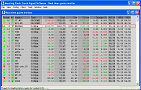
Main window
|
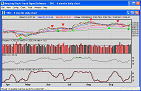
Technical chart
|
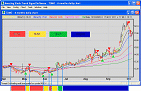
4T Trading strategy
|
In the stock market, it is all about
TREND! TREND!! TREND!!!
Trend is our good friend, so never be a hero to fight against stock trend.
The stock trend change can't finish in a couple of days,
but once it is formed, we have to respect it.
Amazing Stock Trend Signal Software catches trend change signal
in the very early
stage when the stock trend
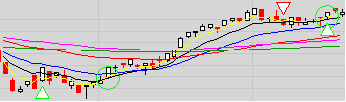
is changing. There are two type
trend change signals, i.e.
green triangles and red triangles:
 - The trend is changing from down to up - The trend is changing from down to up
 - The trend has changed from down to up - The trend has changed from down to up
 - The trend is changing from up to down - The trend is changing from up to down
 - The trend has changed from up to down - The trend has changed from up to down
Amazing stock software, stock chart, stock quote, stock technical analysis,
stock trend, buy sell signal software!
After Amazing Stock Trend Signal Software alerts
trend change signals,
it will suggest buy sell signals
if the stock software considers the stock trend is tradable.
There are two type of
stock buy sell signals, i.e. green circle and red circle:
 - The buyers are overwhelming - Buy Signal - The buyers are overwhelming - Buy Signal
 - The sellers are overwhelming - Sell Signal - The sellers are overwhelming - Sell Signal
Once the stock trend is determined, now you know
when to buy or sell stocks accurately.
Just follow the signals, here is invest4y.com's
famous 4T stock trading strategy:
|
Action
|
Condition
|
Indicators
|
|
WAIT
|
when current stock trend is down
|
|
|
HUNT
|
when current stock trend is changing from down to up
|
|
|
SHOOT
|
when the buyers are overwhelming
|
|
|
PROFIT
|
whenever you are happy after you buy
|
|
With the help of Amazing Stock Trend Signal Software,
you will be able to avoid those tragic stocks like
PRTL,
XYBRE
and
JDSU.
You will be able to catch big moves like
AIQ
and
CAND!
Amazing stock technical analysis chart software!
Still not convinced?
Download
and test Amazing Buy Sell Signal Stock Software right now!
|
|

 "Main screen - Amazing Stock Trend Signal Software")
 "Technical chart - Amazing Stock Trend Signal Software")
 "4T Stock trading strategy - Amazing Stock Trend Signal Software")